How to register
Create your free coaching account. Registration and use of the FIBA Europe Coaching App website are completely free.
Where to go: Login page → Register for free
Step by step
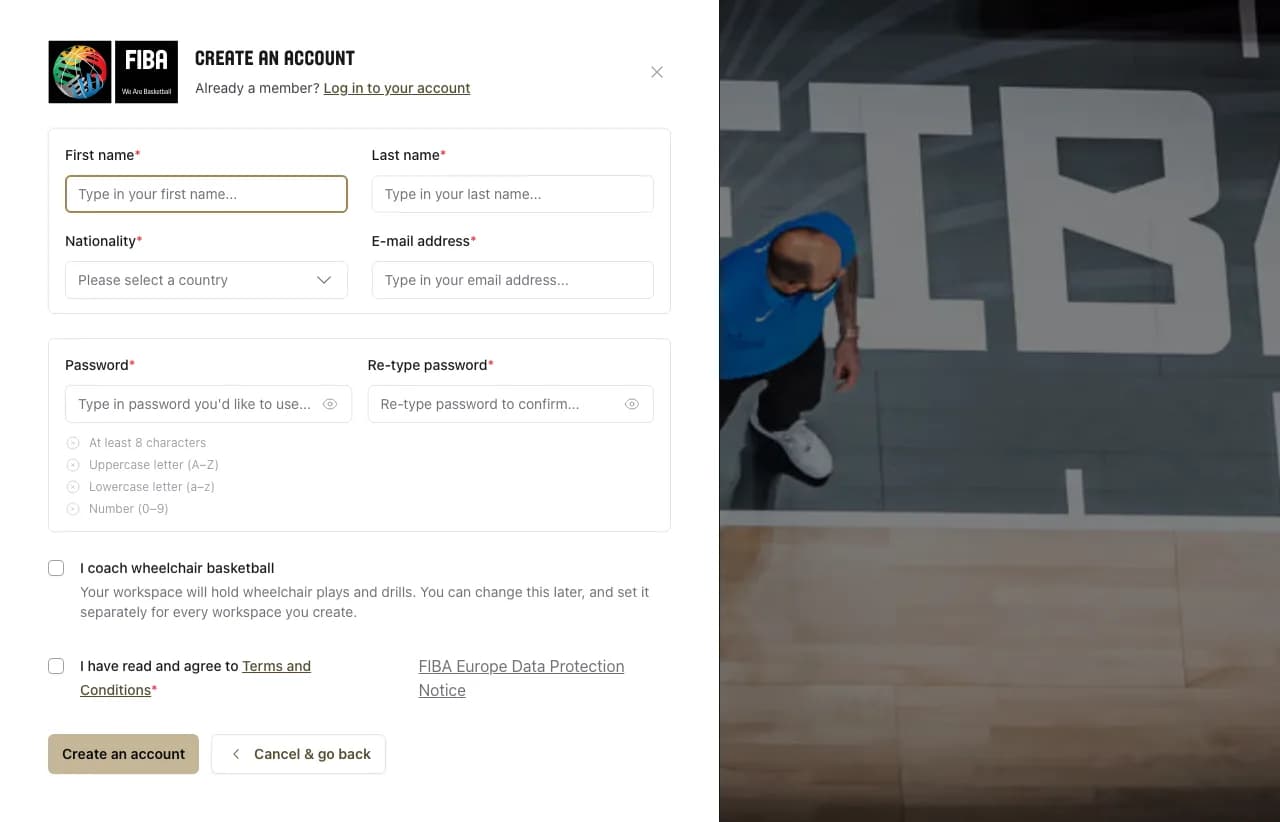
- On the login page, select Register for free to open Create an account.
- Enter your first name, last name, nationality and e-mail address. Use an e-mail address you can access to receive the confirmation link.
- Create a password with at least 8 characters, including an uppercase letter, a lowercase letter and a number. Enter it again in Re-type password.
- If applicable, select I coach wheelchair basketball. This sets up your initial workspace for wheelchair plays and drills; you can change this later for each workspace.
- Read the Terms and Conditions and the FIBA Europe Data Protection Notice. If you agree to the terms, select the required agreement checkbox, then Create an account.
- When prompted to confirm your e-mail address, open the confirmation e-mail and follow its link. Check your spam folder if it does not arrive; use Send the link again when that option is offered.
- Return to the login page and sign in with your e-mail address and password. Explore the dashboard, create your team and plan your first practice.